
Shift management

Rosters planned weeks ahead, gaps seen before they happen.

Plan shifts by site and team, assign people in bulk, and see coverage, conflicts and who is over hours before the week starts. Ramadan and public-holiday hours apply on their own.

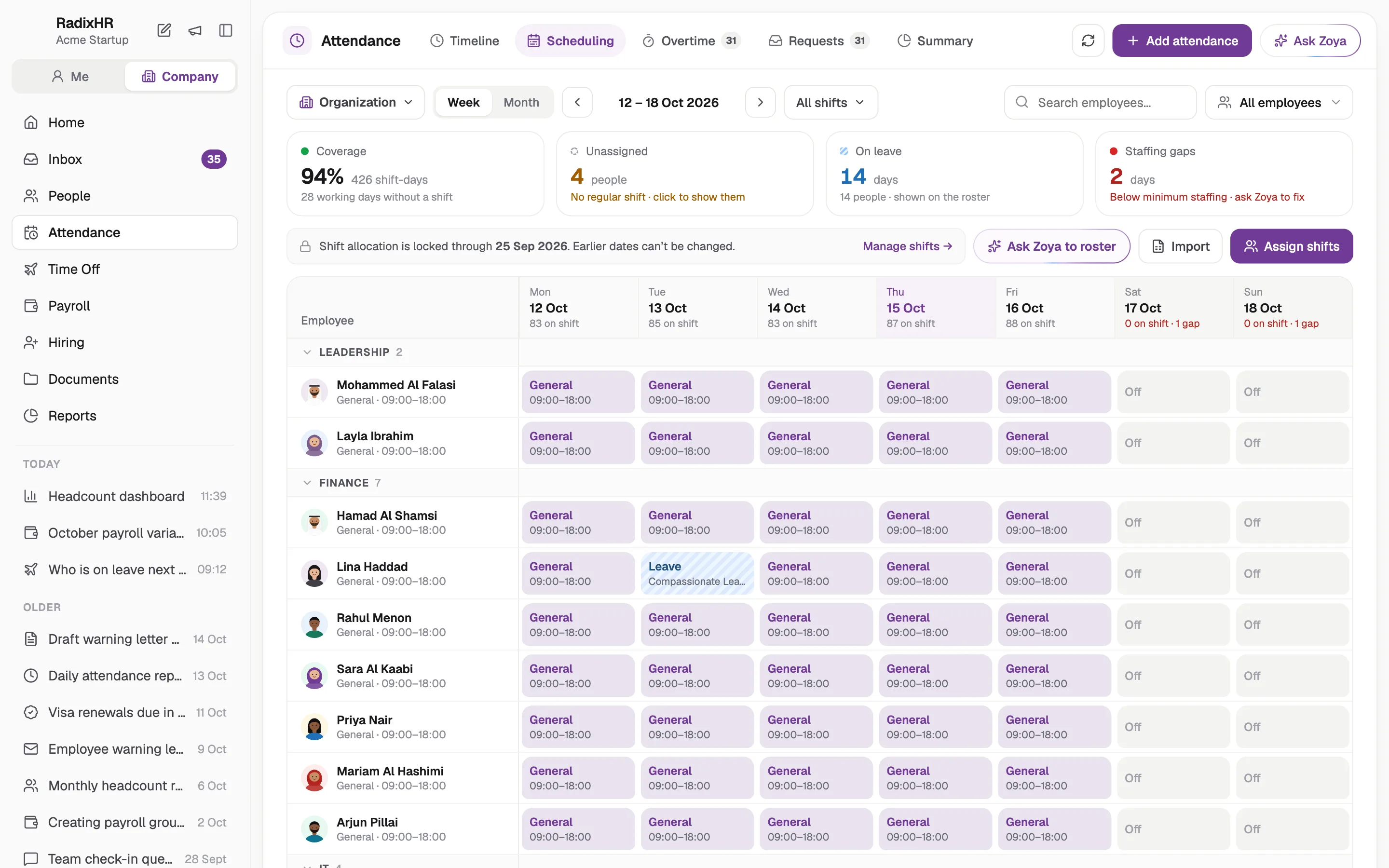
The shift planner: a week's roster by person and site, with coverage and unassigned shifts highlighted.
Week published46 people · 3 shifts2 gaps, 2 suggestionsFriday night · ranked
  • Regular, split, night and open shifts
  • Weekly-off patterns that rotate
  • Ramadan hours applied
  • Conflicts caught before publishing

The week, planned by site and team.

Build the roster once, assign a shift to a whole department in one go, and publish. Everyone sees their week in the app; the planner sees coverage per shift and who is still unassigned.

  • Bulk assignment by department or search
  • Date-specific overrides without touching the pattern
  • Employee-row and calendar views
Week of 26 OctJebel Ali warehouse · 3 shifts · 46 peoplePublished
Morning 06:00–14:0018 of 18
Evening 14:00–22:0016 of 16
Night 22:00–06:00Friday short by 2 · suggestions ready10 of 12
Weekly offRotating, 2 days
Coverage96%

46 people notifiedRoster for 26 Oct · app and WhatsApp

Shifts that match how your sites really run.

Night shifts that cross midnight, split shifts for restaurants and retail, flexible windows for office teams. Each shift carries its own tolerances, breaks and clock-in rules, so attendance is judged fairly.

  • Night shifts attributed to the right day
  • Split shifts with several slots and one total
  • Early clock-in windows and grace periods per shift
Night shift22:00 – 06:00 · crosses midnightNight
Clock-out counted on the next dayOvertime after 06:00 at the night rate
30 min early clock-in10 min grace45 min breakRamadan 20:00–04:00
Assigned to 12 peopleSaved
Rotating weekly offFri–Sat, then Sun–Mon

Gaps filled with the right people.

When a shift is short, RadixHR ranks who can cover it: availability, skills, hours already worked this week and fairness. Conflicts with leave, overlapping shifts and the 48-hour limit are shown before you assign.

  • Ranked suggestions, applied in one click
  • Leave, overlap and overtime conflicts flagged
  • Fair rotation of unpopular shifts
Friday night, 2 openWho can cover · rankedSuggested
Hamad Al ShamsiForklift licence · 38 h this weekBest fit
Joseph D'SouzaAvailable · 41 h this weekGood fit
Mariam Al HashimiOn approved leaveConflict
Rahul MenonWould pass 48 hOver limit
Both notified on assignmentAssign 2
Friday night coveredHamad and Joseph assigned

And the rest of the roster.

Everything else scheduling touches, handled in the same place.

  • Weekly-off rules

    Fixed, alternating or multi-week rotating patterns, applied to a shift or overridden per person.

  • Split shifts

    Two or more slots in a day, with breaks and total hours worked out across them.

  • Tolerances

    Early clock-in windows, late grace and early-departure rules, set per shift type.

  • Public holidays

    UAE holidays and Ramadan hours on the calendar, so rosters adjust themselves.

  • Open shifts

    Publish unfilled slots and let eligible people pick them up from the app.

  • Attendance and payroll

    Every clock-in is judged against the shift, and the hours flow into the run.

Built around the rules you work under.

The UAE's working-time rules are in the planner, not in a checklist on your desk.

  • A 48-hour working week and a weekly rest day, checked while you plan, under Federal Decree-Law No. 33 of 2021
  • Two hours off the working day during Ramadan, applied to every shift automatically
  • Night work between 10pm and 4am marked so overtime is paid at the night rate
  • Public holidays from the UAE calendar, with holiday overtime flagged
  1. DefineShifts, breaks, tolerances and weekly-off patterns.
  2. AssignPeople in bulk, by department or by search.
  3. CheckCoverage, conflicts and hours over the limit, before publishing.
  4. PublishEveryone sees their week in the app.
  5. TrackClock-ins judged against the shift; hours flow into payroll.

What changes on roster day.

Three jobs most UAE operations teams still do by hand.

TaskSpreadsheets & bank portalsRadixHR
Building the weekA spreadsheet per site, copied from last week and fixed by hand.Patterns and weekly-off rules that repeat, with overrides for the exceptions.
Finding coverA WhatsApp broadcast and whoever answers first.People ranked by availability, skills and hours, assigned in a click.
Telling peopleA photo of the roster in the group chat.Each person's week in the app, with changes pushed to their phone.

Loved by teams across the UAE.

Businesses that replaced spreadsheets and manual tracking with RadixHR, in their own words.

  • Payroll in seconds, fully compliant.

    “RadixHR streamlined our HR and payroll while ensuring full statutory compliance. We now generate payroll within seconds through automated data integration — reducing processing time and manpower dependency.”
    Sufaija Mohamed AliHR Manager, Sun Packaging Systems (TPAC UAE)
  • Several hours back, every week.

    “We needed a system that could scale without adding complexity. RadixHR streamlined HR and payroll across teams, cut manual work, and our HR team now saves several hours every week.”
    MusthafaCOO, Al Ershad Group
  • Every branch's attendance, in one view.

    “Managing attendance across multiple branches was a persistent challenge. RadixHR delivered accurate, centralised attendance tracking and clear reports — improving visibility and simplifying compliance reporting.”
    Sanu DevasiaCEO, Safe Max Fire & Safety

Questions, answered.

Regular shifts with fixed times, flexible shifts with a tolerance window, split shifts with several slots in a day, night shifts that cross midnight, and open shifts people can pick up. Each carries its own breaks, tolerances and clock-in window.

Choose the shift, pick people by department or search, set the date range and assign. For a one-off change, add a date-specific assignment without touching the regular pattern.

A rule defines which days are off: fixed days every week, alternating days, or a rotating multi-week cycle. Apply the rule to a shift, or override it for an individual.

When a shift's end time is earlier than its start, it is treated as crossing midnight. A clock-out on the next calendar day is attributed to the right shift, and hours between 10pm and 4am are marked for the night overtime rate.

Yes. For an open or short shift it ranks eligible people by availability, skills, hours already worked and fairness, shows any conflict with leave or the weekly limit, and lets you apply the suggestion in one click.

You either end the current assignment and start a new one, or add a date-specific override. The change is logged, the employee is notified, and the new shift applies from the date you set.

Still have a question?Talk to us

A little less admin. A little more human.

Bring payroll, attendance and everyday HR together, so your team has more time for the people behind the work.

Book a free demo
Illustration of colleagues sharing a quiet moment in a sunlit courtyard garden